Back to School Icons 3: A Practical Asset for Educators, Marketers, and Design Professionals
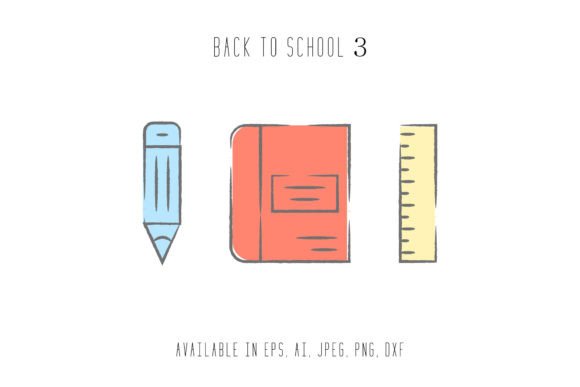
Back to School Icons 3 is a compact, professionally crafted icon set designed specifically for seasonal educational campaigns, classroom resources, and back-to-school marketing initiatives. Unlike generic icon bundles, this collection focuses on thematic consistency and functional clarity—featuring 24 distinct, hand-crafted icons representing core elements of the academic transition: backpacks, notebooks, pencils, graduation caps, digital devices, calendars, and inclusive student figures. Its value lies not in quantity but in intentionality: each icon supports visual communication that’s immediately legible, culturally appropriate, and adaptable across platforms.
What You Receive—and Why Format Variety Matters
The package delivers six file formats—AI, EPS, SVG, DXF, JPG, and PNG—each sized to a consistent 1920px × 1280px canvas. This uniformity simplifies asset management and ensures predictable scaling. The vector formats (AI, EPS, SVG, DXF) preserve crispness at any size, making them suitable for both large-format printing (e.g., banners or posters) and fine-detail applications like app UI elements or lesson plan handouts. SVG stands out for web use: lightweight, responsive, and compatible with modern CMS platforms and learning management systems (LMS) such as Canvas or Moodle. The JPG and PNG files offer immediate usability for social media graphics, email headers, or blog illustrations—no editing software required.
Importantly, all vector files are layered and grouped logically—not flattened or embedded. That means users can isolate individual components (e.g., change the color of a pencil’s eraser without affecting the shaft), adjust stroke weights, or extract subsets for custom icon sets. This level of editability supports iterative design workflows common among freelance designers, curriculum developers, and small business owners managing their own branding.
Quality and Consistency Across Use Cases
Icons in Back to School Icons 3 follow a clean, semi-flat style with subtle shadows and balanced negative space—avoiding excessive detail that degrades at small sizes. Stroke widths remain uniform across the set, and proportions align with WCAG 2.1 contrast guidelines when rendered in standard dark-on-light configurations. In practice, this translates to strong legibility even at 32px thumbnails used in digital course catalogs or mobile-first school newsletters.
Testing across real-world contexts reveals reliable performance: SVG exports render correctly in Chrome, Safari, and Edge; EPS files open cleanly in Adobe Illustrator CS6 through CC 2024; DXF imports smoothly into Cricut Design Space and Silhouette Studio—making the set viable for educators creating tactile classroom materials or makers producing vinyl-cut signage. The PNG includes transparent background support, eliminating manual clipping for overlay work in Canva or PowerPoint—common tools for teachers building slide decks or parent engagement flyers.
Who Benefits Most—and How They’re Likely to Use It
Educators and school communications staff find immediate utility in Back to School Icons 3 for internal resource development: designing welcome packets, orientation checklists, digital bulletin boards, or printed hallway displays. Because the icons avoid cartoonish exaggeration, they suit both elementary and secondary audiences—unlike many “back to school” assets that skew heavily toward preschool aesthetics.
Marketing professionals and small business owners—especially those serving education-adjacent markets (tutoring services, edtech startups, school supply retailers)—use the set to maintain visual continuity across campaign assets. For example, a regional tutoring center might deploy the calendar and notebook icons across Facebook ads, Google Display Network banners, and printable enrollment forms—all while preserving brand color schemes and tone.
Freelance designers and content creators appreciate the time saved when assembling client deliverables. Rather than sourcing disparate icons from multiple libraries (and reconciling inconsistent line weights or stylistic quirks), they can build cohesive presentations, pitch decks, or website mockups using a single, unified system. One designer reported cutting average icon integration time by 40% when switching from mixed-source assets to Back to School Icons 3 for a K–12 LMS redesign project.
Practical Considerations and Realistic Limitations
While versatile, Back to School Icons 3 isn’t intended as a comprehensive design system. It doesn’t include icon variants for accessibility states (e.g., disabled or hover versions), nor does it ship with font files or CSS sprite sheets. Users needing animated states or multi-color icon families will need to extend the assets manually—or pair them with complementary tools.
The set also assumes basic familiarity with vector editing software. While PNG and JPG files require no technical skill, unlocking full flexibility—such as recoloring individual layers or exporting custom SVG sprites—does require comfort with Illustrator or Affinity Designer. Beginners may benefit from supplemental tutorials, though the well-organized layer structure reduces the learning curve significantly.
Another practical note: the 1920×1280 canvas size suits landscape-oriented layouts well but may require minor cropping or repositioning for strict square or vertical applications (e.g., Instagram Stories or Pinterest pins). That said, the vector source files allow straightforward resizing without quality loss—so adaptation remains efficient.
Integration Into Existing Workflows
For teams using Figma or Adobe XD, the SVG files import cleanly and retain editable paths—enabling direct use in interactive prototypes. When paired with auto-layout frames, designers can rapidly generate icon-driven navigation menus or progress indicators for online courses. Similarly, WordPress developers have embedded the SVGs directly into theme templates via inline code, ensuring fast loading and SEO-friendly markup (with proper alt attributes added manually).
In print production, the EPS and AI files hold up under high-DPI output. One university communications office used the set across a 48-page orientation guide, matching Pantone spot colors precisely—thanks to editable swatches preserved in the native files. No pixelation, no vendor misalignment, no last-minute substitutions.
Long-Term Value and Strategic Fit
Back to School Icons 3 delivers recurring utility—not just for August campaigns, but across academic-year touchpoints: mid-year progress reports, parent-teacher conference materials, end-of-term celebrations, and summer program promotions. Its neutral-yet-warm aesthetic avoids trend dependency, meaning assets created today remain appropriate three years from now. That durability supports cost-per-use efficiency, especially compared to subscription-based icon libraries where access lapses or licensing changes can disrupt established workflows.
It’s also interoperable with broader design ecosystems. Users report successfully combining these icons with free Google Fonts (e.g., Quicksand or Nunito) and accessible color palettes from tools like Coolors.co—creating cohesive, compliant visual systems without additional licensing overhead.
Ultimately, Back to School Icons 3 earns its place not as a novelty item but as a quietly capable component in professional creative infrastructure. It serves best when matched with clear intent: supporting clarity over decoration, consistency over variety, and usability over ornamentation. For anyone regularly communicating around academic transitions—whether crafting a district-wide newsletter, launching an online course, or designing classroom visuals—it offers grounded, repeatable value without unnecessary complexity.